Voxel Reflections
World-space, off-screen reflections for Three.js TSL and WebGPU.
three-voxel-reflections · 1.0.0-rc.1 · MIT
Documentation · Interactive lab · API
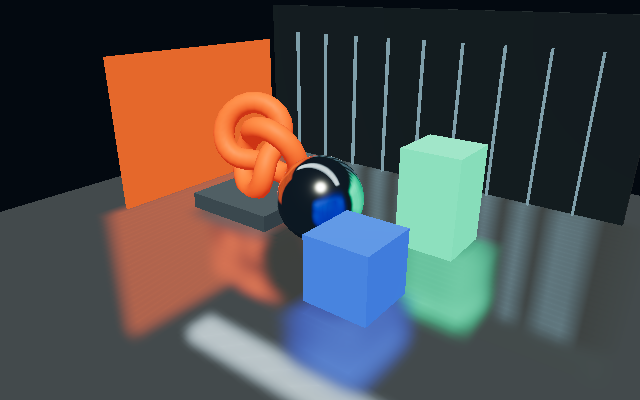
A camera-independent voxel radiance cache supplies reflection rays with geometry and lighting that are not present in the primary camera image. Smooth receivers use occupied-cell DDA traversal; rough receivers use a six-direction radiance hierarchy and front-to-back cone integration. There is no screen-color or screen-depth dependency, no temporal history, and no camera-centered voxelization.
Release status: v1 release candidate. Native WebGPU and WebGL2 validation passed on an Apple M4 with Chrome 152, including GPU readback, the upstream VXGI adapter, semantic TypeScript checks, and a clean tarball consumer. Cross-vendor native testing and performance characterization remain stable-v1 gates. See validation for reproducible evidence and limits.
Run the lab
Node.js 22 or newer is required for the development scripts.
npm ci
npm run dev
Open http://localhost:4173. The lab uses native WebGPU by default and displays an error rather than silently falling back. The explicit ?backend=webgl comparison uses the same TSL graph on WebGL2. All demo geometry is generated locally; no models, fonts, HDR files, or CDN assets are required.
The three scenes demonstrate fully behind-camera sources, roughness filtering, and reflections on a floor and curved receiver. Controls expose cache resolution, roughness, bias, raw radiance, accumulated opacity, an occluder, and source movement.
The package is prepared for publication as three-voxel-reflections (unscoped). Until an npm release is published, build a local checkout and install it with npm install /path/to/three-voxel-reflections, or install the tarball produced by npm pack.
Integrate
Use one Three.js revision throughout your application. The peer range is intentionally restricted to r186 because TSL and the experimental lighting add-ons evolve together.
import { Box3, Vector3, WebGPURenderer } from 'three/webgpu';
import { VoxelReflections } from 'three-voxel-reflections';

const renderer = new WebGPURenderer({ antialias: true });
await renderer.init();
if (!('isWebGPUBackend' in renderer.backend) || !renderer.backend.isWebGPUBackend) {
  throw new Error('This application requires native WebGPU.');
}

// scene, camera and mirror are your existing Three.js objects.
// mirror.material must be a MeshStandardNodeMaterial or MeshPhysicalNodeMaterial.
const reflections = new VoxelReflections({
  staticVolume: {
    resolution: 64,
    bounds: new Box3(new Vector3(-12, -4, -12), new Vector3(12, 20, 12)),
    shadows: true
  },
  maxDistance: 40,
  normalBias: 1.25
});

reflections.bind(mirror.material);

renderer.setAnimationLoop(() => {
  reflections.update(renderer, scene);
  renderer.render(scene, camera);
});

// After meshes move, visibility changes, geometry changes, or material colors/maps change:
reflections.invalidateGeometry();

// After supported light colors, intensities, or transforms change:
reflections.invalidateLighting();

// At teardown, after stopping your render loop:
// reflections.dispose();
The default volume is baked on the CPU, then uploaded as half-float 3D textures. Only dirty caches are rebuilt. The reflection shader and texture filtering execute on the rendering backend. Do not rebake a large CPU cache every animation frame: use explicit update cadence or the optional GPU adapter for that workload.
Use the upstream GPU volume
The optional adapter consumes the public sampling nodes of Three.js VXGIVolume. It does not vendor or fork the upstream voxelizer and can share a cache with another lighting system.
import { VXGIVolume } from 'three/addons/lighting/vxgi/VXGIVolume.js';
import { VoxelReflections } from 'three-voxel-reflections';
import { VXGIVolumeAdapter } from 'three-voxel-reflections/vxgi';

const upstream = new VXGIVolume(128);
upstream.directionalRadiance = true;
upstream.bounces = 0;

const adapter = new VXGIVolumeAdapter(upstream, true);
const reflections = new VoxelReflections({ volume: adapter, ownsVolume: true });
reflections.bind(mirror.material);
// Call reflections.update(renderer, scene) before rendering.
The pinned npm r186 distribution includes this VXGI add-on. The structural adapter is isolated in its own entry point, so importing the main package does not require that experimental add-on. Native tests cover isotropic/directional volumes, textured sources, both Z ray signs, rough mips, occlusion, and moving sources. Review the adapter guide for the supported contract.
Custom materials and nodes
import { vec3 } from 'three/tsl';

// Full reflected radiance, without BRDF weighting:
const radiance = reflections.createRadianceNode({
  roughness: myRoughnessNode,
  fallback: vec3(0.03, 0.04, 0.06)
});

// Premultiplied RGB and accumulated opacity, without fallback:
const trace = reflections.createTraceNode({
  position: myWorldPositionNode,
  normal: myWorldNormalNode,
  viewDirection: mySurfaceToCameraNode,
  roughness: myRoughnessNode
});

// Specular term with explicit F0:
const specular = reflections.createSpecularNode({
  roughness: myRoughnessNode,
  f0: vec3(0.92),
  fallback: myEnvironmentRadianceNode
});
trace.a is accumulated opacity, not probabilistic confidence or a distance field. createRadianceNode and createSpecularNode apply fallback only to unoccluded transmittance. Custom view and normal vectors are normalized by the tracer. Custom positions must be in the same world coordinate system as the cache.
The material binding preserves the previous emissive node and adds the reflected term. It suppresses the material environment node by default to avoid double-counted environment reflections. This also suppresses that material's diffuse environment contribution. Set replaceEnvironment: false only when the additional environment contribution is intentional, or compose a custom lighting graph.
The convenience binding reads base color, metalness, roughness maps/nodes and the receiver's world normal. Its default dielectric F0 is 0.04. Supply f0 explicitly for non-default IOR/specular responses. It does not implement separate clearcoat, anisotropic, transmission, or iridescent reflection lobes.
Supported by the portable cache
Static indexed/non-indexed BufferGeometry, object transforms, static instances, material groups, vertex colors, linear albedo/emission, readable color/emissive/alpha textures, alpha testing, and selected scene layers. Ambient, hemisphere, directional, point, and spot lights can be injected. Optional DDA shadows use the voxel geometry, not Three.js shadow maps.
Set mesh.userData.voxelReflections = false to exclude a mesh from the cache without hiding it from the primary camera. This is useful for a mirror-only diagnostic plane, but excluding a receiver also removes its occlusion and appearance from other receivers' reflections. layerMask and filter provide more general selection.
Skinning/morph deformation requires a baked static snapshot. Blended transparency is excluded, not silently simulated as glass. Compressed textures, video, arbitrary procedural material graphs, source normal/displacement maps, volumetrics, view-dependent outgoing specular transport, and reflected reflections are not evaluated by the portable baker. Readable material maps use nearest CPU sampling; the radiance volume uses trilinear GPU filtering.
Quality and limits
The volume has finite bounds. Geometry outside those bounds cannot contribute. Finite voxel size causes stepped sharp reflections, loss of thin detail, conservative surface thickening, approximate self-intersection bias, and broad-cone leakage at geometric discontinuities. A smoother cone is not an exact GGX integral. This is not planar-mirror accuracy, hardware ray tracing, or an unlimited-scene replacement for every SSR use case.
Tighten world bounds before increasing resolution. The portable cache expands non-cubic bounds to an enclosing cube. The RGBA16F base plus six-direction hierarchy uses approximately 0.46 MiB at 32³, 3.71 MiB at 64³, and 29.71 MiB at 128³, excluding driver allocation overhead. CPU attributes, floating-point mip construction, and texture upload arrays use additional memory.
Commands
npm run build                 # ESM + isolated declarations; not semantic type checking
npm run typecheck             # Full checking against installed Three.js typings
npm test                      # Build and deterministic CPU/scene tests
npx playwright install chromium
npm run test:browser           # Native WebGPU; fallback is a failure
npm run test:browser:webgl     # Explicit WebGL2 comparison
npm run check                 # Full typecheck + unit tests
npm run test:package          # Pack, clean install, strict TypeScript + runtime consumer
npm run build:site            # Static documentation + vendored interactive lab
npm run test:site             # Links, Pages subpath, controls, desktop/mobile layouts
npm run preview:site          # Built site at http://localhost:4174
npm run validate              # All checks above, recorded evidence + source hashes
CHROME_BIN chooses a browser executable. --headed can be passed to the browser runner. VXR_SOFTWARE=1 requests SwiftShader for the explicit WebGL comparison; a Linux environment may also require a running X server. Do not interpret software timings as desktop GPU benchmarks.
Project map
src/core: slab intersection, conservative triangle tests, voxel DDA, directional mip hierarchy, CPU tracing oracle.src/voxelandsrc/lighting: scene collection, texture sampling, static voxelization and radiance injection.src/tslandsrc/rendering: shader construction, interchangeable volume contract, material lifecycle and upstream adapter.examples,tests,validation, anddocs: interactive lab, reproducible checks, captured evidence and integration details.
See architecture, API, validation, and release checklist.